
Criteria
Introduction
By now, you should have the server running and all dependencies installed. In the following sections, we'll explain some of those dependencies and provide links to their docs for ease of access. Finally, we'll go over what is expected to meet the criteria of this assessment.
Dependencies
At any point, feel free to install packages you believe will help you move through the tasks faster. We think that the libraries we use are straightforward enough to pick up quickly and we've provided examples in this repo that you can copy, but please use what you are comfortable with. The following are the main packages you'll interact with if you leave everything as is.
- clsx - A tiny (228B) utility for constructing className strings conditionally.
- headlessui - Completely unstyled, fully accessible UI components, designed to integrate beautifully with Tailwind CSS.
- nextjs - The React Framework for the Web
- recoil - A state management library for React
- tailwindcss - A utility-first CSS framework for rapidly building custom user interfaces.
- tailwindcss/typography - Beautiful typographic defaults for HTML you don't control.
- testing-library - Simple and complete testing utilities that encourage good testing practices
Dev Dependencies
We've configured formatting and linting rules along with the necessary plugin configurations so that you can get to coding without worrying about configuration files.
It's unlikely that any additional packages you install will cause conflicts, but feel free to update their config files as needed.
The API
You will need to hit our public-facing API located at https://dev.wagmo.io/api/1.0/breeds/. This endpoint returns an array of objects as follows:
{
	"id": 559,
	"name": "Mixed Breed",
	"mixed": true,
	"petType": 1
},
Out of the return data, you primarily need to focus on the name and petType to complete this project.
Base Requirements
For this exercise, the following items should be met:
- All breed data is fetched from the API listed above
- NOTE: (CORS is enabled, so you'll have to avoid making the fetch client side)
- The Pet Type input should have nothing selected by default
- The Pet Breeds input field is hidden until we know the Pet Type
- The user should be able to select from two buttons labeled "Cat" and "Dog"
type TDog = 0type TCat = 1
- Once a Pet Type selection is made, the image should be displayed matching the selected Pet Type.
- Once a Pet Type selection is made, the user should be presented with the Pet Breed input field.
- The user should be able to type to search for their pet's breed in the Pet Breed input field.
- The user should only see suggestions/options for breeds associated with the selected Pet Type.
Bonus Requirements
Before moving on to the bonus tasks, please ensure you've optimized or refactored your code and addressed any errors that may interrupt a smooth demo. The following enhancements should build on your already existing functionality and will focus on making the experience more interactive for a user.
- The user should have navigation arrows that allow them to move between steps.
- The user should be unable to move to the next step if the first step fails validation.
- The user should only see a single step at a time.
- Once the user finishes the first step, we should auto-scroll to the second step
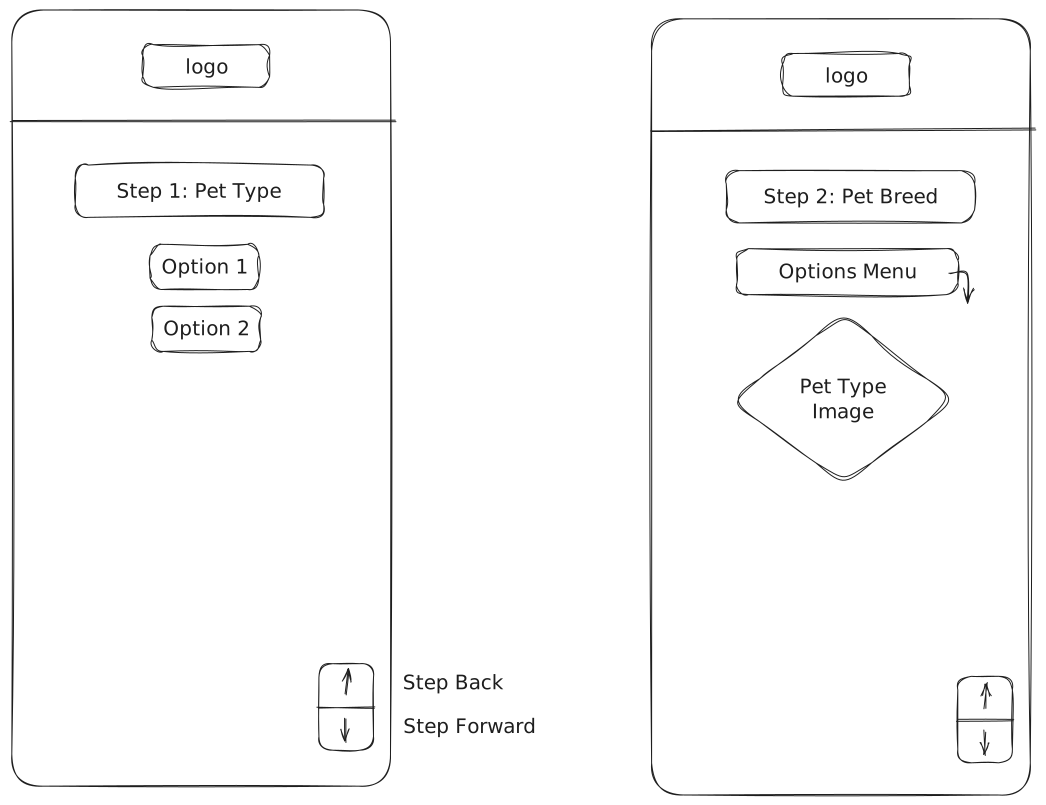
Wire Frame
Use the following as a starting point for what you app should look like. Feel free to look at our current quiz or other resources for additional inspiration.